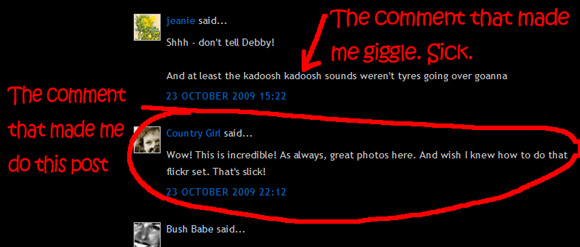
Aside: if you have a sick sense of humour you can investigate my sister's comment above Kate's ... I don't know WHERE she gets it from. Really.
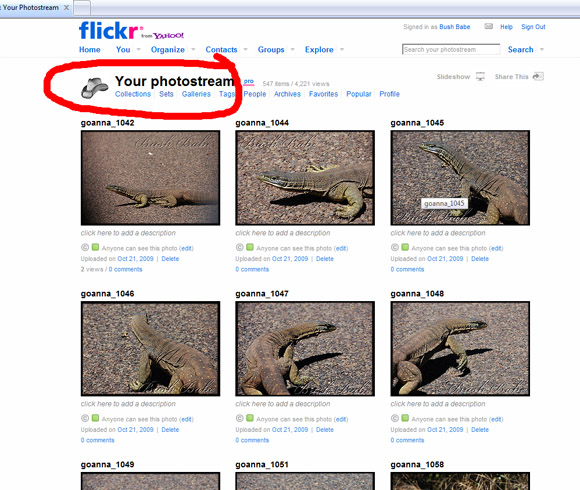
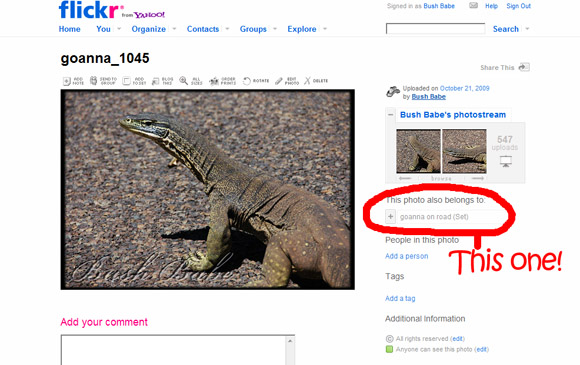
Now click on the set link (circled above). This should bring up a nice neat set of thumbnails of your set.
(There are other ways to look at your Sets on Flickr... but this appears to be the only way I can see to get a slideshow happening with it. If I am wrong, don't hesitate to tell me. I will be the last person to be shocked by the news!)
Anyway... you should now see an option for creating a slideshow: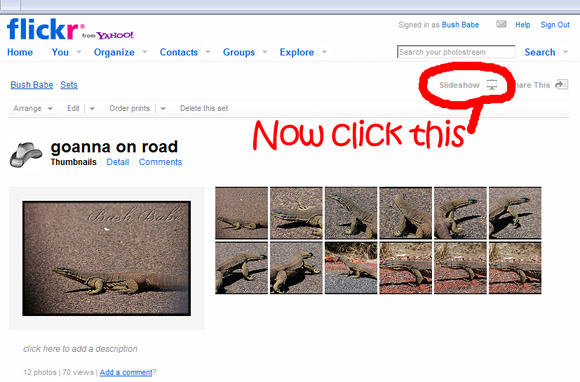
Do as the red text tells you and CLICK!
(Talk about some BOSSY red text. Sheesh!)
And a full-screen version of the slideshow should start happening.
It's important not to panic at this stage...
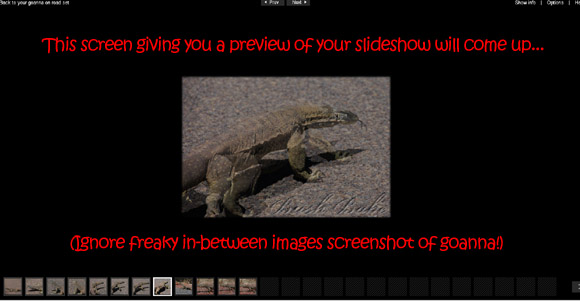
There IS a way to wrestle this sucker across to your blog...trust me!
After seeing that the order of images is right and it looks kinda the way you envisaged, you need to click on the black part of the page to force the options to come up at the top right.
Like this:

And you want to SHARE here (you KNOW you do!). Now you can simply copy and paste the HTML script 'as is'.
Or ...you can be really fussy and OCD and CHECK IT for sizing etc. *ahem* Should we do that? You talked me into it...
Click on CUSTOMISE HTML (circled bossily red for you in above image)
And you should see a pop-up window like this:
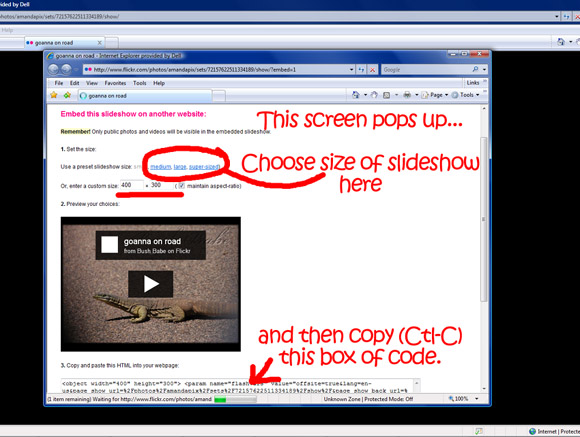
You can choose the SIZE of your slideshow here
(that's what the red text says, and I believe it!).
If you know the limits of your blog body in pixels (this is HTML stuff, if your eyes are glazing) and you can choose an appropriate size. If you want it to sit exactly, you can alter the size (please remember to click 'maintain aspect ratio' so you keep everything looking normal - things can end up quite warped otherwise). If you don't know your blog dimensions exactly, have a guess at the size - you can always back to alter later on. You will just need to re-do the steps from this point on when you make changes so they are reflected in your blog.
If you are happy with the preview, highlight the code box at the bottom of the pop-up page, and copy (Ctl-C).
Now head immediately back to your 'new blog post' page in your blog publisher - the place where you want to insert your slideshow. Now I have only ever used Blogger, but I imagine that every blog set-up allows you to write in either easy / compose mode (that's ME most of the time!) or HTML.
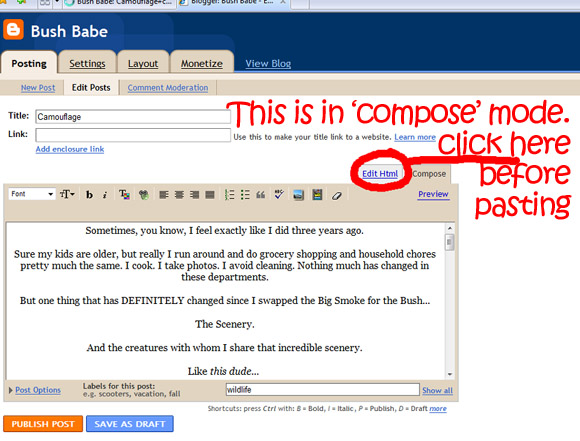
Slip over to the HTML section for a sec ...
and paste (Ctl-V) into the box.
The code will end up in amongst a lot of text... 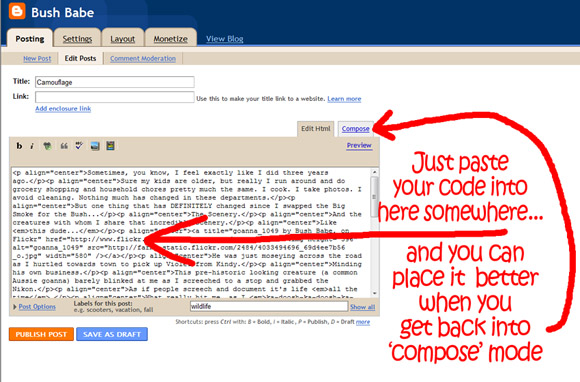
Be careful (if you can't read HTML code) to pop it in at the very start or the very end of the post. Otherwise you might stuff your formatting or mess your other images up. And I'd hate to have you suing me for wrecking a post on you! You can always haul it around to the right position once you are back in 'compose' mode. (Please note that it will look like a blank box here, but should show up as a slideshow in the 'preview' OK).
And once you have stopped fiddling with things around your new slideshow, you should be able to hit 'publish' and see your slideshow sitting in your post like this:
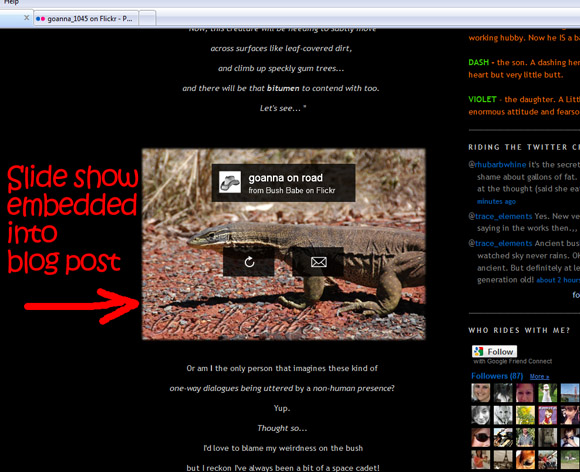
Voila! Or WA-LAH as Dash would say...
And to prove it wasn't a one-off event, here 'tis again:
NB I have sized this to 600 px wide - the real estate on my blog where my posts end up (the column you are looking at now, in fact!). This area is dictated by the HTML behind the blog layout and (in mine) it is assigned to 610px, so this slideshow almost fills the space but gives a tiny bit of leeway for the eye. I found this measurement in the HTML section of the Edit Template part of my blog publisher, described as 'main wrapper'. I discovered it by accident when I decided to fiddle one day. I almost lost the entire blog design, but hey... no-one lost an eye!!
...
MY QUESTIONS FOR YOU:
1. Was this HOW TO post remotely helpful to you?
2. Did I lose you at 'Hello'?
3. Did I lose you mid-stream, perhaps at the HTML talk?
4. You couldn't care less about slideshows and just want to see more photos of Old Stuff?
5. What (if anything) would you like to see next in a slideshow here?
All advice, hints and constructive criticism happily taken.
*a 'BB How-To' to come if people are interested.